


Instant digital delivery

Safe & secure payment

Steam Gift Cards UK: The Ultimate Guide for Gamers, Parents and Gift Buyers
Steam gift cards give gamers the freedom to choose their next game, explore new software or pick up extra content for a favourite title.
Whether you’re treating yourself, buying a present or setting a gaming budget for your teenager, a Steam gift card offers a straightforward way to add credit to a Steam Wallet. In this guide, we’ll explain how these cards work, what you can use them for and how to buy one online at Recharge.com.
What is a Steam gift card?
A Steam gift card is a prepaid voucher that adds funds to a Steam Wallet. Once redeemed, the balance can be spent on eligible purchases through Steam, Valve’s digital gaming platform.
Rather than choosing a specific game, you choose how much credit to give. The recipient can then decide what to buy.
What can you use a Steam gift card for?
Steam Wallet funds can be used for a range of purchases:
Games: Choose from major releases, indie favourites and more.
Software: Explore the creative tools and other applications available on Steam.
Downloadable content: Buy expansions, additional levels and other extras for compatible games.
In-game items: Pay for eligible items and purchases that support Steam Wallet payments.
Hardware: Put funds towards hardware sold directly through Steam, subject to availability and purchase requirements.
A Steam gift card is also a thoughtful option when you know someone loves gaming but aren’t sure what’s already in their library.
Benefits of using a Steam gift card
Freedom to choose
Choosing a game for someone else can be tricky. They might already own it, prefer another genre or be saving for an upcoming release. A gift card lets them decide what they’ll enjoy most.
Easy gifting
Birthdays, Christmas or a simple thank-you: a Steam gift card suits plenty of occasions. A digital code is especially convenient when you need a present without waiting for a parcel.
No need to save a bank card on Steam
Redeeming a gift card lets you spend the added balance without saving credit or debit card details to your Steam account. You’ll still need to protect your account and keep your code private.
A practical way to budget
A gift card gives you a set amount to put towards gaming. For parents and carers, it can be a useful way to agree a gaming allowance.
Remember that a gift card doesn’t control every aspect of an account. Spending rules and account settings still matter, especially if other payment methods are available.
Why buy Steam gift cards online?
Buying online makes it easy to organise a gaming gift or top up your own balance from home.
Digital delivery
There’s no physical card to collect or parcel to track. Recharge.com advertises instant email delivery once payment is confirmed, making it convenient for last-minute gifts.
Check the available amount before buying
Online shopping lets you review the available gift card value before placing your order. Choose an option that suits your budget, and check the total price before paying.
Convenient payment options
Recharge.com’s UK Steam page displays payment options including Visa, Mastercard, PayPal, American Express and Apple Pay. Check the options offered at checkout for your order.
Product details in one place
Before buying, review the card’s currency, country of use and redemption requirements. This is particularly useful when purchasing a gift for someone abroad.
Why buy Steam gift cards at Recharge.com?
Recharge.com brings online purchasing and digital delivery together, so you can buy Steam credit in a few straightforward steps.
Certified reseller
Recharge.com lists itself as a certified Steam reseller, giving buyers a clear place to purchase their code.
Convenient online purchasing
Select your card, provide your delivery details and complete payment online. Double-check your email address before ordering so your code reaches the right inbox.
A useful option for parents and carers
Buying a fixed amount of Steam credit can help you set an agreed gaming budget without adding your own bank card to your teenager’s Steam account.
It also leaves the choice of game with them—handy when their wishlist changes faster than you can keep up.
Help with order questions
If you have a question about your Recharge.com purchase, visit the Recharge.com Help Centre. For issues involving your Steam account or purchases made on Steam, contact Steam Support.
How to purchase and redeem Steam gift cards
Buying from Recharge.com
Visit the Recharge.com UK Steam gift card page.
Review the available card value and product details.
Check that the currency and country of use suit the recipient’s Steam account.
Enter your email address carefully.
Choose an available payment method and review the total cost.
Complete your purchase and follow the delivery instructions to access your code.
Redeeming your Steam gift card
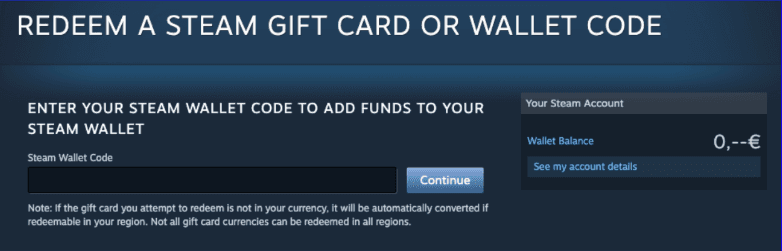
Open Steam’s Redeem a Steam Gift Card or Wallet Code page.
Sign in to the Steam account you want to add funds to.
Enter your gift card code.
Select Continue and follow any on-screen instructions.
Check your Steam Wallet balance before shopping.
Can you buy a Steam gift card for someone in another country?
Before buying a gift for someone abroad, check the card’s country and currency requirements against their Steam account. Recharge.com’s UK Steam product is listed for use in the United Kingdom and denominated in GBP. Don’t assume it will work with an account in another region.
Keep the code private until you give it to the intended recipient. Never share it with an unfamiliar person requesting payment: Steam gift cards are for purchases on Steam, and requests to use them to settle unrelated bills are a warning sign of a scam.
Ready to up your game with a Steam gift card?
A Steam gift card lets you give something personal while leaving the final choice to the gamer. It’s also a practical way to plan your own gaming spending, whether you’re building a wishlist or waiting for your next must-play release.
Visit Recharge.com to check the available UK Steam gift card options and find your next gaming gift.