

The complete EA SPORTS FC 27 keyboard controls — both official default layouts, every attacking and defending binding, and the new combos. Search any mechanic to find its key.
FC 27 Keyboard Controls: Full WASD and Arrow Keys Layouts
FC 27 Keyboard Controls: Full WASD and Arrow Keys Layouts
EA SPORTS FC 27 ships the biggest keyboard controls overhaul the series has had in years: two redesigned default layouts, and a set of new combos that put mechanics like the power shot and disguised first touch within reach without a controller.
Search any mechanic below to see its key in both official layouts side by side — useful whether you are switching layout, coming from a controller, or just trying to remember where hard super cancel went.
FC 27 Keyboard Control Finder
EA ships FC 27 with two default keyboard layouts — one built around WASD, one around the arrow keys. Type a mechanic below and this shows you the key in both, side by side.
Search the controls
These are the FC 27 default layouts — controls remain fully rebindable in the game’s settings.
Unofficial fan tool by Recharge.com — not affiliated with or endorsed by EA or EA SPORTS. Bindings shown are EA’s published FC 27 defaults for keyboard play.
The two default layouts
FC 27 gives you a choice of two redesigned defaults rather than one. Both cover the same mechanics; they differ in which hand does the moving.
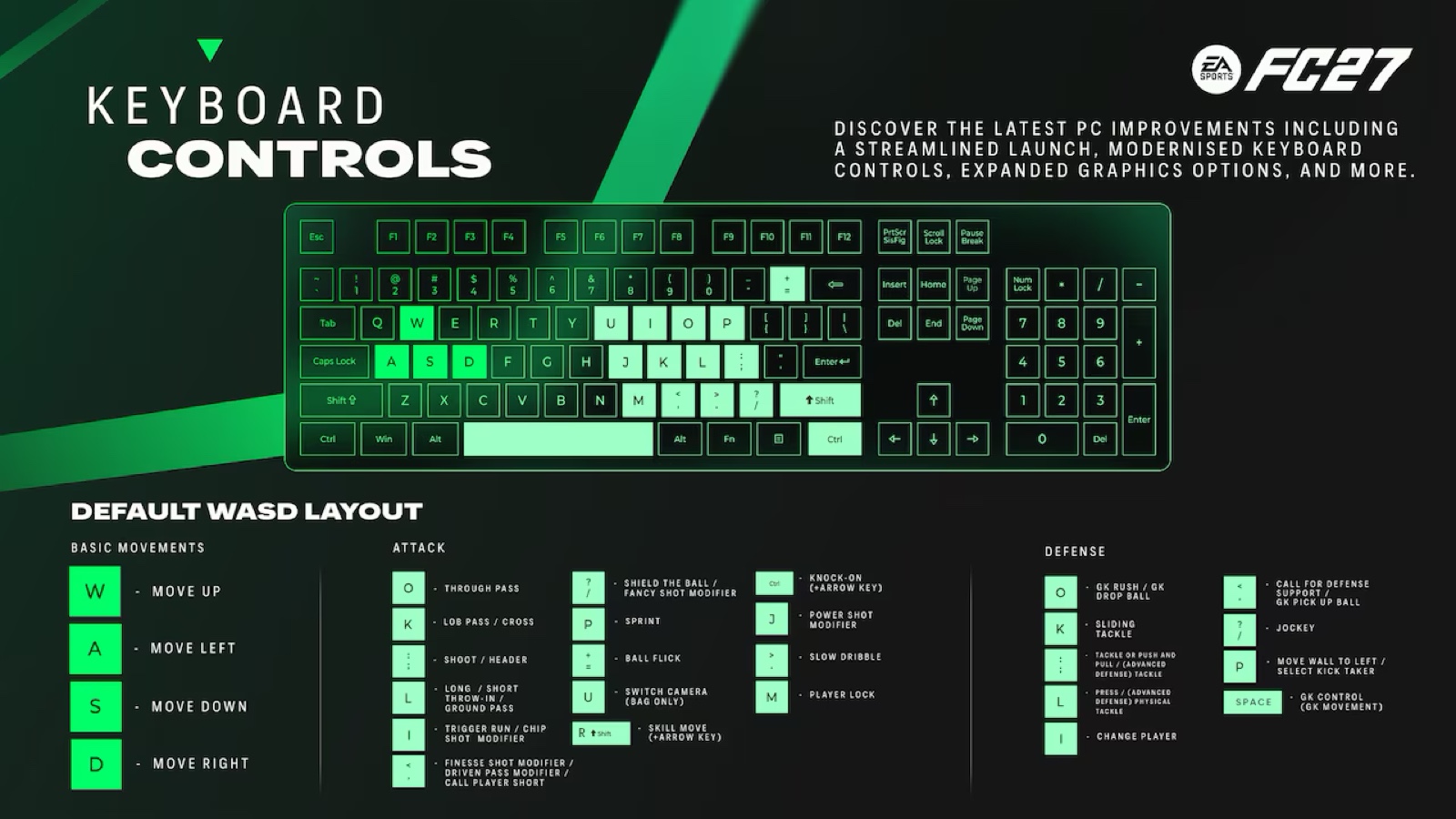
WASD layout
Movement on W A S D, with attacking and defending actions spread across the right-hand side of the keyboard — through pass on O, lob pass and cross on K, shoot on the semicolon key, sprint on P, player lock on M.
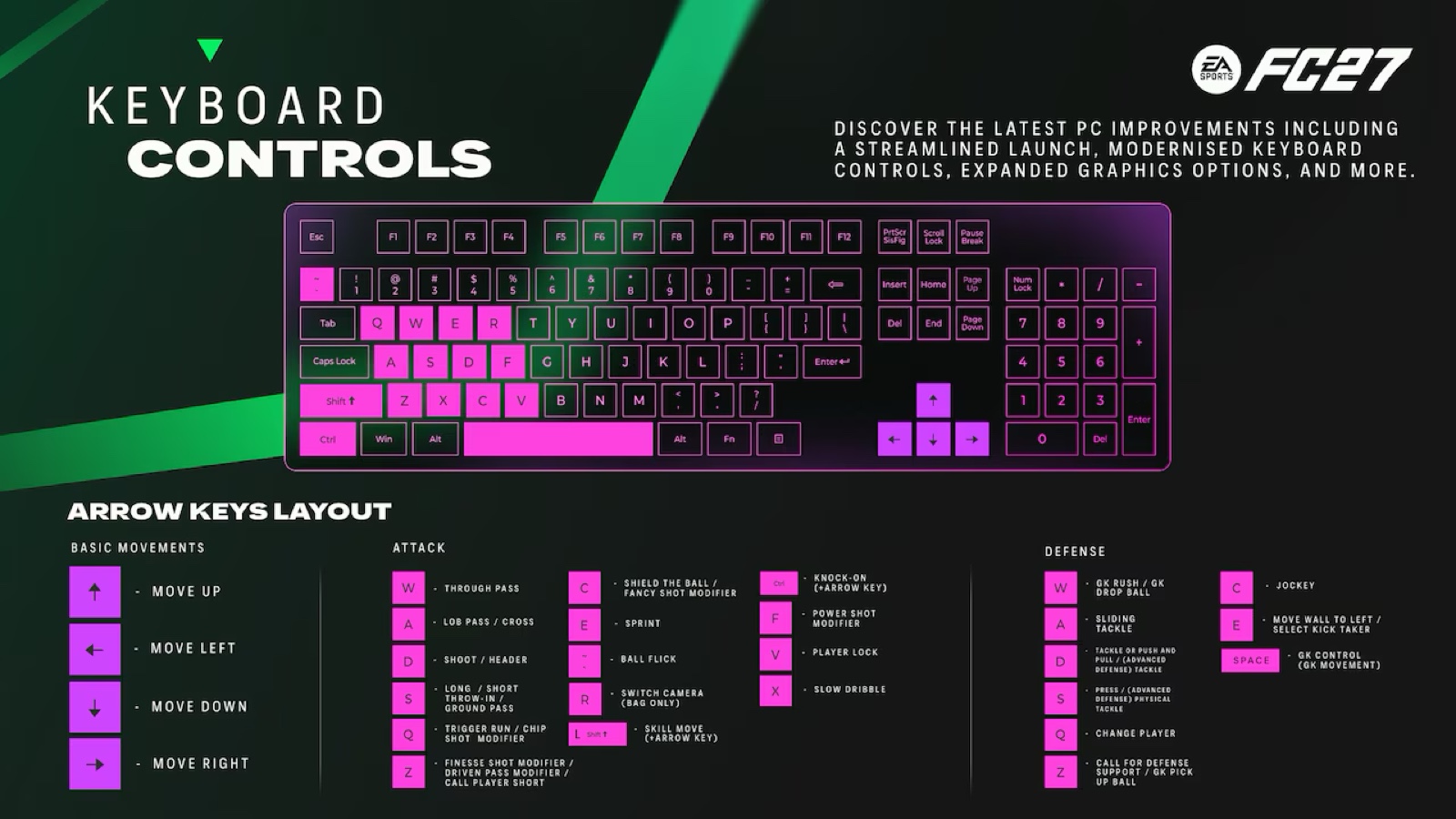
Arrow keys layout
Movement on the arrow keys, with the action bindings mirrored onto the left hand: through pass on W, lob pass and cross on A, shoot on D, sprint on E, player lock on V. If you have played with arrow keys in previous editions, this will feel closest to home.
The new keyboard combos
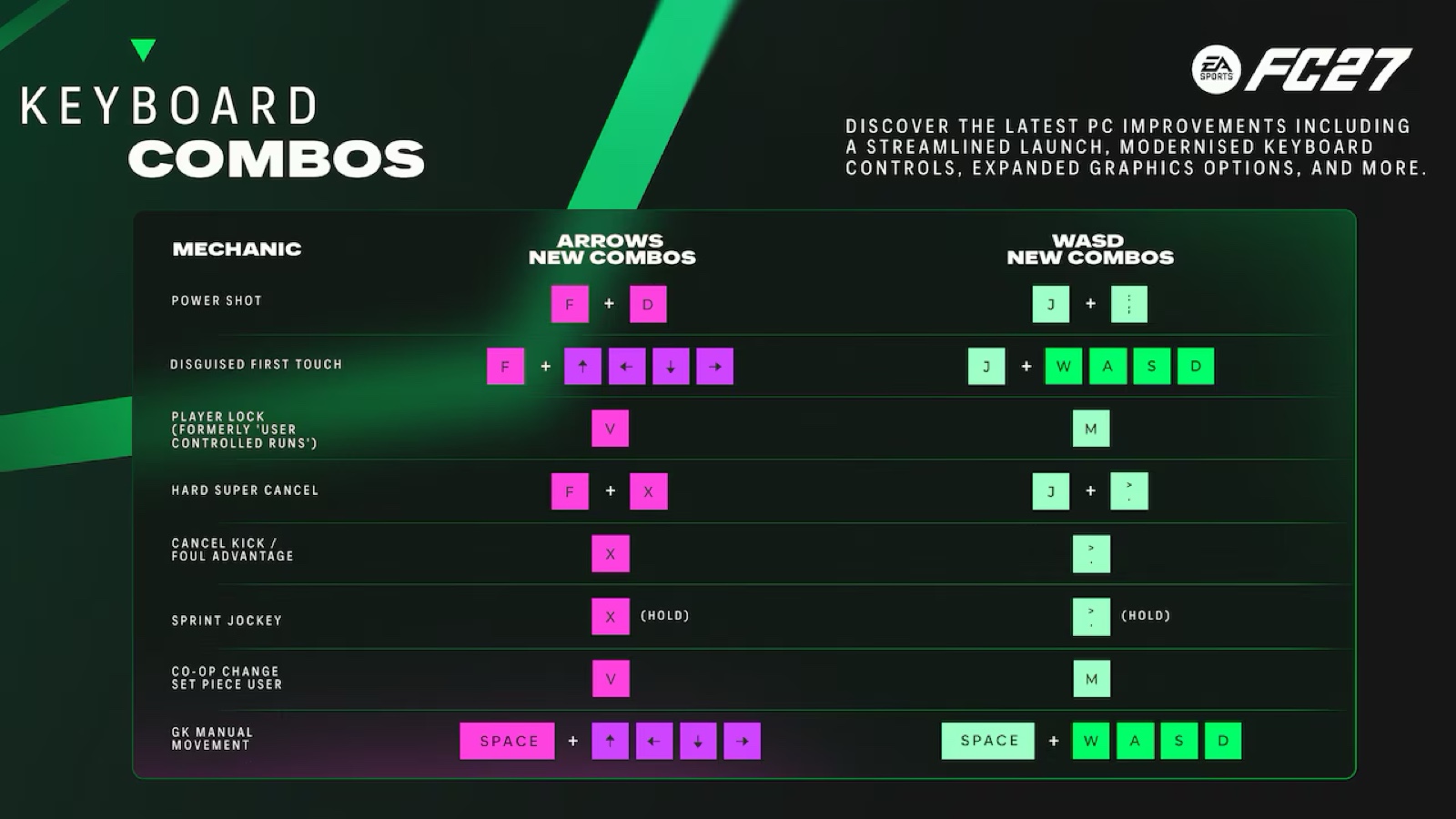
These are the additions that matter most competitively. Eight mechanics that previously favoured a controller now have proper keyboard combos, including the power shot, the disguised first touch and manual goalkeeper movement.
Power shot
J + ; on WASD, or F + D on arrow keys. The power shot has been one of the strongest arguments for playing FC on a controller — this closes that gap.
Disguised first touch
J plus a direction (W/A/S/D) on WASD, or F plus a direction (arrow keys) on the arrows layout.
Player lock
M on WASD, V on arrow keys — formerly known as user controlled runs. The same binding also handles co-op change set piece user. Note that player lock behaves differently in FC 27: while you control an off-ball player, the ball carrier no longer automatically dribbles around defenders.
Hard super cancel, cancel kick and sprint jockey
Hard super cancel is J + > (WASD) or F + X (arrows). Cancel kick and foul advantage sit on > or X on their own, and holding that same key gives you sprint jockey.
Manual goalkeeper movement
Space plus a direction, in either layout. Space alone remains GK control.
Can you still rebind everything?
Yes. These are defaults, not a fixed scheme — every control remains fully customisable in the game’s settings, so you can start from whichever layout is closer and adjust from there. EA also added keyboard shortcuts for in-match tactical changes, so you can adjust your setup without leaving your core bindings.
For the rest of what changed on PC — the four-tier spec sheet, the VRAM indicator, faster launches and Steam friends — see the FC 27 PC requirements guide.
FC 27 FAQ
What are the default keyboard controls in FC 27?
FC 27 has two official default layouts. WASD puts movement on W/A/S/D with actions on the right hand (through pass O, lob pass K, shoot ;, sprint P). Arrow Keys puts movement on the arrows with actions on the left hand (through pass W, lob pass A, shoot D, sprint E).
How do you do a power shot on keyboard in FC 27?
Press J + ; on the WASD layout, or F + D on the arrow keys layout. It is one of eight new keyboard combos added in FC 27.
What is the player lock key in FC 27?
M on the WASD layout and V on the arrow keys layout. Player lock was previously called user controlled runs. In FC 27 the ball carrier no longer automatically avoids defenders while you control another player, so it carries more risk than before.
Can you change the keyboard controls in FC 27?
Yes — both layouts are defaults and every binding remains fully customisable in the game’s settings. FC 27 also adds keyboard shortcuts for in-match tactical adjustments.
How do you control the goalkeeper with a keyboard in FC 27?
Space is GK control. For manual goalkeeper movement, hold Space plus a direction — W/A/S/D on the WASD layout or the arrow keys on the arrows layout.
More FC 27
- FC 27 PC requirements: can your PC run it?
- FC 27 gameplay changes after the closed beta
- FC 27 squad builder
- FC 27 player ratings database
- FC 27 player comparison tool
- FC 27 pack opener simulator
Unofficial fan content by Recharge.com — not affiliated with or endorsed by EA SPORTS. Specifications, keyboard layouts and gameplay changes are taken from EA’s official FC 27 Pitch Notes (PC Deep Dive, 2 September 2026, and Closed Beta Feedback Update, 3 September 2026). EA SPORTS FC 27 launches worldwide on 25 September 2026.

Written by
Conor Byrne


