

Want to create your own skin in CoD Mobile? Our 2026 guide shows how to use the Gunsmith to customize weapon camos, charms, and operators for a truly unique look.
How to Create Custom Skins in CoD Mobile (2026 Guide)
How to Create Custom Skins in CoD Mobile (2026 Guide)
Understanding Customization in CoD Mobile
If you’re searching for how to create your own skin in Call of Duty Mobile, you’ve come to the right place. Let’s get straight to the point: while you cannot upload your own graphic files or draw a skin from scratch due to game limitations, you absolutely can create deeply personalized and unique loadouts. This guide will walk you through every in-game system that allows you to customize your weapons and operators to stand out in any match in 2026.
In Call of Duty (CoD) Mobile, customization is broken down into two main categories: Operator skins, which change your character’s appearance, and Weapon skins, which alter the look of your firearms. While Operator skins are usually pre-set outfits you unlock or purchase, the weapon customization is far more robust. The Gunsmith system is the primary way players learn how to create custom in cod; it’s a powerful tool that allows for a level of personalization far beyond simple pre-made skins. By understanding these systems, you can achieve a look that feels completely your own, much like optimizing your subscriptions and getting the most out of other gaming services.
Summary
This guide explains how you can customize your look in Call of Duty Mobile. While you can’t upload your own designs, you’ll learn how to use the Gunsmith to personalize weapon camos, stickers, and charms. You will also discover how to unlock elite “completionist” camos like Gold and Diamond, customize your character’s accessories, and find answers to common questions about skin creation.
TLDR
- You cannot upload your own images or draw skins from scratch in CoD Mobile.
- You can extensively customize weapons using the in-game Gunsmith with camos, stickers, reticles, and charms.
- You can unlock special “completionist” camos like Gold, Platinum, and Diamond by completing weapon challenges.
- You can customize your character (Operator) by changing their outfit, backpack, and sometimes headgear.
- Using third-party apps to change skins will get your account permanently banned.
📑 Table of Contents
- Understanding Customization in CoD Mobile
- Customizing Weapon Skins Using the Gunsmith
- Unlocking and Equipping Base Camos
- Applying Stickers, Reticles, and Charms
- Combining Blueprints with Custom Camos
- Grinding for Completionist and Tournament Camos
- Gold, Platinum, Damascus, and Diamond
- Seasonal Tournament Camos
- Customizing Your Operator (Character Skins)
- Frequently Asked Questions (FAQ)
Customizing Weapon Skins Using the Gunsmith
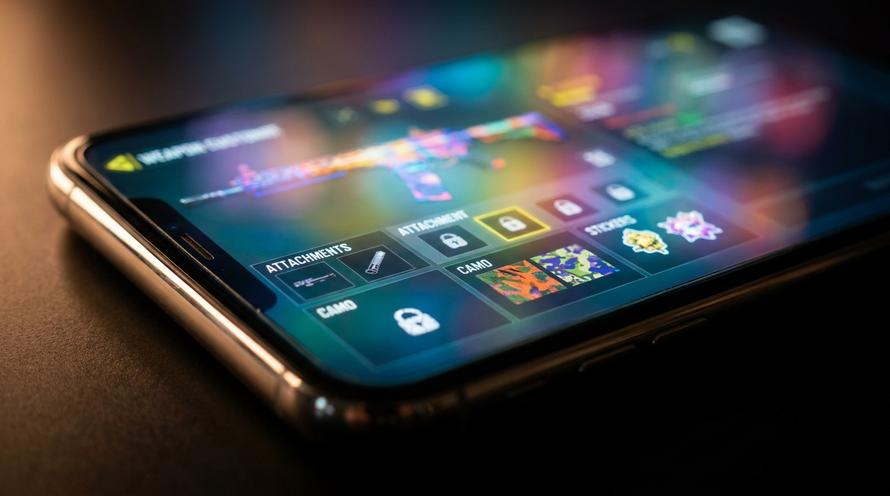
The Gunsmith is the heart of all weapon personalization in CoD Mobile. It’s where you not only choose your attachments but also control the entire visual aesthetic of your firearm. From changing its base colour and pattern to adding small personal touches, this is the primary method players use to make their gear feel unique.
Unlocking and Equipping Base Camos
The first layer of customization comes from grindable camos. As you use a weapon and gain Weapon XP, you’ll unlock different sets of patterns. These are organized into six main categories: Sand, Dragon, Splinter, Tiger, Jungle, and Reptile. Each category contains multiple camos that are unlocked by completing specific challenges, such as getting a certain number of headshots or hip-fire kills.
💡 Tips for Levelling Up Weapons Quickly
- Use Double Weapon XP Cards: Activate these before a match to double the experience points you earn for your equipped weapon.
- Play High-Kill Game Modes: Modes like Hardpoint or Domination on small maps (e.g., Shipment, Rust) offer more opportunities for kills, leading to faster XP gain.
- Focus on Challenges: Actively work towards the camo challenges (e.g., “get 50 headshots”) as they often grant bonus XP.
- Complete Daily Missions: Many daily missions and event tasks provide Weapon XP cards as rewards.
Applying Stickers, Reticles, and Charms
Beyond the base camo, you can add several layers of flair to your weapon. These accessories don’t affect gameplay but are crucial for making your weapon stand out.
Stickers
You can place up to four unique stickers on different parts of your weapon. These are earned through the Battle Pass, events, and in-game bundles.
Reticles
For any optic attachment (like a Red Dot or Holographic sight), you can change the colour and shape of the reticle itself. New reticle designs are unlocked through specific kill challenges.
Charms
These are small trinkets that hang off the side of your weapon. Charms are often animated and serve as a fun, dangling accessory to personalize your gun.
Combining Blueprints with Custom Camos
This is the ultimate answer to how to make custom in cod. Weapon Blueprints, especially those of Epic, Legendary, or Mythic rarity, often change the physical shape (geometry) of the weapon. They might add unique iron sights, a different stock design, or other custom parts. The true magic happens when you take one of these unique blueprint models and apply an unlockable camo over it. For example, you can take a Legendary blueprint with custom animations and apply the Diamond camo on top, creating a weapon combination that very few other players will have.
Grinding for Completionist and Tournament Camos
For players who want to truly show off their dedication, completionist camos are the highest tier of cosmetic rewards. These skins cannot be bought; they must be earned through rigorous in-game challenges and represent true mastery of a weapon.
Gold, Platinum, Damascus, and Diamond
These are the four main “mastery” camos that signal your skill and dedication. Unlocking these is considered the ultimate “custom” flex in the game.
- Gold
- Unlock every single grindable camo (Sand, Dragon, etc.) for one specific weapon.
- Platinum
- Unlock the Gold camo for every weapon in a single class (e.g., all Assault Rifles, all SMGs).
- Damascus
- The ultimate prize. Unlock the Platinum camo for every single weapon class in the game.
- Diamond
- After unlocking Gold for a weapon, get 10 kills in a match with that weapon for 150 matches (requirements may vary by weapon type).
Seasonal Tournament Camos
Every weekend, CoD Mobile hosts a Tournament Mode. By playing and winning matches in this mode, you earn crowns which can be redeemed for exclusive rewards. The most sought-after prizes are the seasonal animated camos. These camos, such as Red Sprite, Glacial Ripple, or Golden Emerald, are incredibly vibrant and can be applied to almost any weapon in your armoury, giving you yet another way to create a standout look.
Customizing Your Operator (Character Skins)
While you can’t build a character from the ground up, you can still alter your Operator’s appearance. The primary way to do this is by unlocking or purchasing different outfits. However, some skins offer an extra layer of customization.
Swapping Backpacks and Headgear
You can significantly alter your character’s silhouette by equipping different backpacks, which are earned through events and the Battle Pass. In your loadout, you can choose to equip any backpack you own or none at all. Furthermore, some older or more advanced skins allow for minor alterations, such as removing a helmet or changing the colour of specific clothing items, giving you more control over your in-game persona.
Frequently Asked Questions (FAQ)
Can you upload your own images to make custom skins in CoD Mobile?
No, Activision does not allow third-party image uploads or user-generated textures. This policy prevents offensive content, ensures a consistent art style, and protects the game’s microtransaction ecosystem. All customization must be done using in-game assets provided by the developers.
How do you get free skins in Call of Duty Mobile?
Players can earn a wide variety of free character and weapon skins through several methods. These include completing challenges in seasonal events, participating in Clan Wars, logging in for the monthly daily rewards, and levelling up the free tier of the seasonal Battle Pass.
Are there third-party apps to create custom skins in CoD?
While some third-party applications or websites may claim to be “skin changers” or generators, using them to modify game files is a direct violation of the Call of Duty Mobile Terms of Service. These apps are unauthorized and using them will result in a permanent ban of your account. It is not worth the risk.
Can I customize vehicles in Call of Duty Mobile Battle Royale?
Yes. Vehicle customization works very similarly to weapon customization. You can earn or purchase different camos, colours, and blueprint designs for your Battle Royale vehicles. You can equip these custom skins through the BR loadout menu in the main lobby before starting a match.
Written by
Conor Byrne
